
Your Meetings.
Your Computer.
Zero Cloud.
Shmeetings transcribes and summarizes your meetings 100% locally using AI that runs on your computer.
No accounts. No subscriptions. No data sharing. Ever.
Your Cloud Meeting Assistant Is
Recording Everything
Every word you say in meetings is sent to remote servers, analyzed, and stored indefinitely by companies you've never heard of.
Your Data Lives on Their Servers
Cloud services upload every recording to third-party servers where your sensitive business conversations are stored and analyzed. Even with "privacy" promises, you have no control over where your data goes.
Recurring Fees Forever
$10, $20, $30 per month adds up to thousands of dollars over your career. Cloud services force you into subscriptions that never end—pay every month or lose access to your own meeting notes.
Data Breaches Are Inevitable
Every month brings news of another data breach. When your meetings live in the cloud, they're one hack away from being leaked, sold, or used against you. It's not "if" but "when."
Your Meetings Train Their AI
Many cloud services use your conversations to improve their AI models. Your private discussions become training data for their products—shared with engineers and machine learning systems you never agreed to.
100% Local AI Meeting Assistant
Shmeetings runs entirely on your Mac. Your meetings never touch the cloud. Ever.
100% Private
Your conversations never leave your computer. No cloud uploads, no servers, no data mining. What happens in your meetings stays in your meetings.
Yours Forever
$39 one-time payment. No subscriptions, no upsells, no recurring fees. Pay once and use Shmeetings for life. Free updates included.
No Account Required
Download, install, and start transcribing. No sign-ups, no passwords, no email verification. Just open the app and go.
How It Works
Three steps. Zero cloud. Complete privacy.
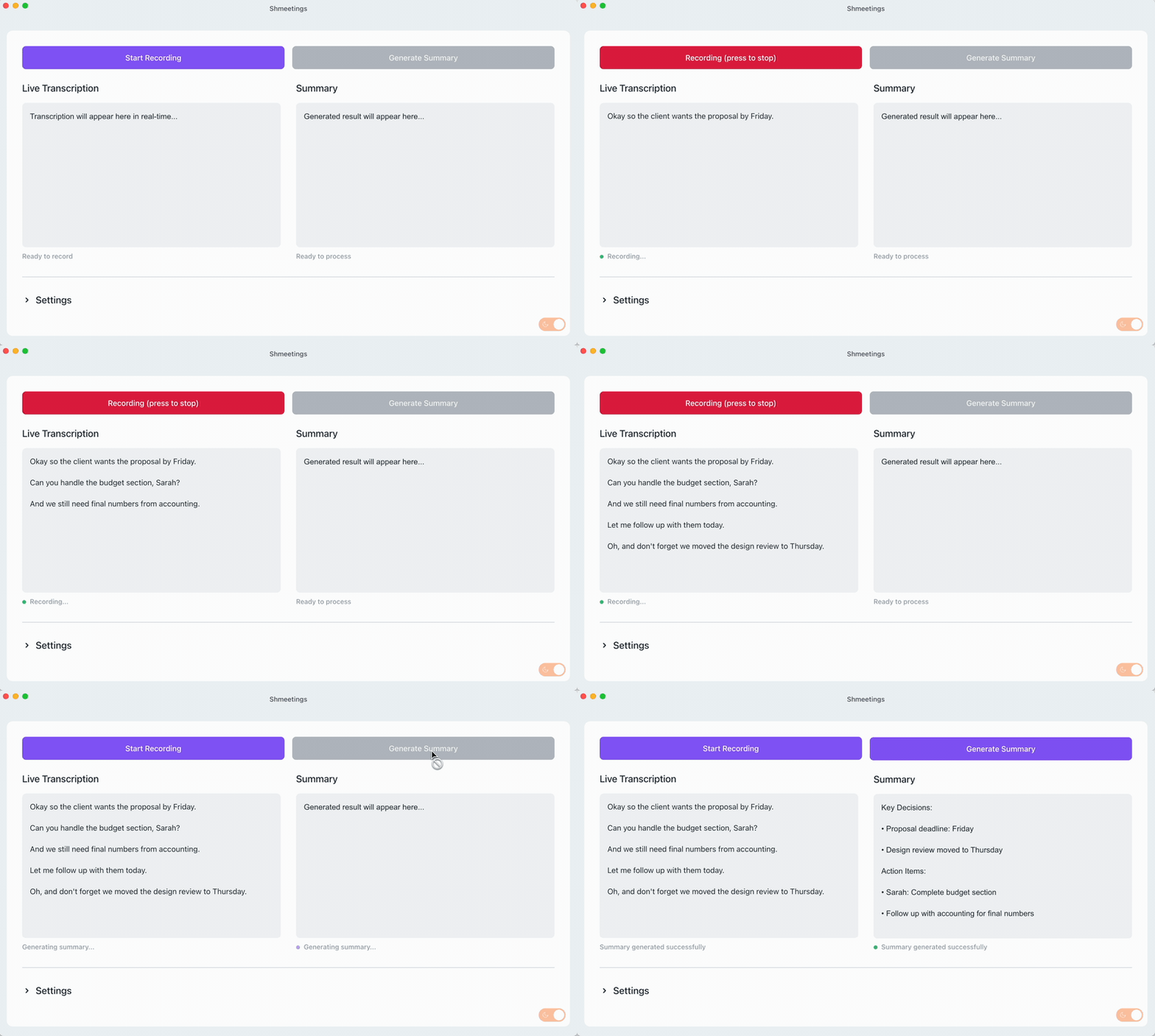
Open Shmeetings
Launch the app and let it run in the background. It auto-detects when meetings start.
Have Your Meeting
Focus on the conversation. Shmeetings transcribes everything locally using Whisper AI.
Get Your Summary
AI generates key points and action items. Optionally auto-email yourself the notes.
Powerful Features
Auto Start/Stop
Detects when meetings begin and end. Set it and forget it.
Meeting Mode
Capture system audio + mic. Wear headphones and transcribe both sides of calls.
80+ Languages
Auto-detects and transcribes Spanish, French, German, Chinese, and more.
Auto Email
Get notes delivered to your inbox automatically after every meeting.
Smart Questions
Stuck in a meeting? AI suggests follow-up questions based on the conversation.
Drag & Drop Audio
Drop MP3, M4A, or WAV files to transcribe recordings, podcasts, or voice memos.
Custom AI Models
Use any GGUF model you want. Swap in different Whisper or Llama variants.
Custom Prompts
Tailor AI summaries to your workflow. Add context docs for smarter output.
Powered by Open-Source AI
Shmeetings uses OpenAI's Whisper for transcription and Meta's Llama for summaries—the same AI powering major companies, but running privately on your Mac.
No internet required. No data shared. Complete control.
Who Uses Shmeetings?
Professionals who value privacy and control over their data
Enterprise Teams
Companies that can't send sensitive discussions to third-party servers.
Legal & Healthcare
Professionals with strict confidentiality requirements and compliance needs.
Consultants & Freelancers
Independent professionals who want to own their data without subscriptions.
Remote Workers
Back-to-back Zoom calls with no time to take notes? Get AI summaries without sharing company data with cloud services.
Agencies & Studios
Client meetings contain sensitive strategy discussions that shouldn't leave your organization.
Privacy-Conscious Users
Anyone who doesn't want their conversations analyzed by big tech.
How Shmeetings Compares
Complete privacy without compromising on features
| Feature | Shmeetings | Cloud Assistants |
|---|---|---|
| 100% Offline Processing | ||
| Your Data Stays Private | ||
| One-Time Purchase | $10-40/mo | |
| No Account Required | ||
| Your Data Never Trains AI |
Frequently Asked Questions
MacOS 11+ with 8GB RAM (16GB recommended), 3GB free space, Apple Silicon processor. Windows version coming soon.
Shmeetings uses OpenAI's Whisper model, which is highly accurate with clear audio. The AI summary doesn't need perfect transcription to extract key points and action items from your meetings.
Yes! Shmeetings works with any meeting platform—Zoom, Teams, Google Meet, WebEx, or even in-person meetings. It transcribes whatever audio your microphone picks up.
Pay $39 once and use Shmeetings forever. You get lifetime access, all features, free updates, and email support. No subscriptions, no recurring fees, no upsells.
We don't offer a free trial, but we do offer a 30-day money-back guarantee. If Shmeetings doesn't work for you, just email us for a full refund—no questions asked.
Currently Mac only (macOS 11+), but we're testing the Windows version now and will release it soon. Stay tuned!
Yes! Shmeetings uses OpenAI's Whisper (the same model powering many cloud services) and Meta's Llama for summaries. These are industry-leading AI models running privately on your Mac. For most meeting notes, local AI delivers excellent results without privacy tradeoffs.
Have more questions?
Contact us →One Price. Forever.
Cloud meeting assistants cost thousands over time. Shmeetings is a one-time $39.
Average subscription cost
- $240/year, $2,400 over 10 years
- Your data on their servers
- Subject to price increases
- Lose access if you stop paying
Total cost over 3 years:
$720
One-time purchase. Forever.
- Pay once, use forever
- 100% offline & private
- Works anywhere, no internet needed
- Free updates for life
- 30-day money-back guarantee
Save $681 vs 3 years of subscriptions
Try Shmeetings risk-free. If it's not for you, email us for a full refund—no questions asked.
Real talk: If you use a cloud meeting assistant for just 2 months, you've paid more than Shmeetings costs for a lifetime. Stop renting software you should own.
Ready to Own Your Meeting Notes?
Join privacy-conscious professionals who refuse to send their conversations to the cloud. No subscriptions. Lifetime updates.
30-day money-back guarantee • Instant download