
Shmeetings 2.4: Auto Start/Stop Now Knows Your Work Hours
Shmeetings 2.4 is out. The headline feature: auto start/stop recording now takes a schedule, so the app only listens during the days and hours you choose.
The problem it solves
Auto start/stop has been one of those set-it-and-forget-it features, except it wasn't quite. It was all or nothing. Turn it on and Shmeetings listened every day, all day. That's exactly what you want during work hours, and exactly what you don't want on Saturday morning, when the app happily starts transcribing a conversation about weekend plans.
The workaround was remembering. Toggle it on Monday morning, toggle it off Friday evening, and hope you remember next week. A memory-based system fails in one direction only, and that direction is your privacy. We wanted the app to handle that boundary itself.
How the schedule works
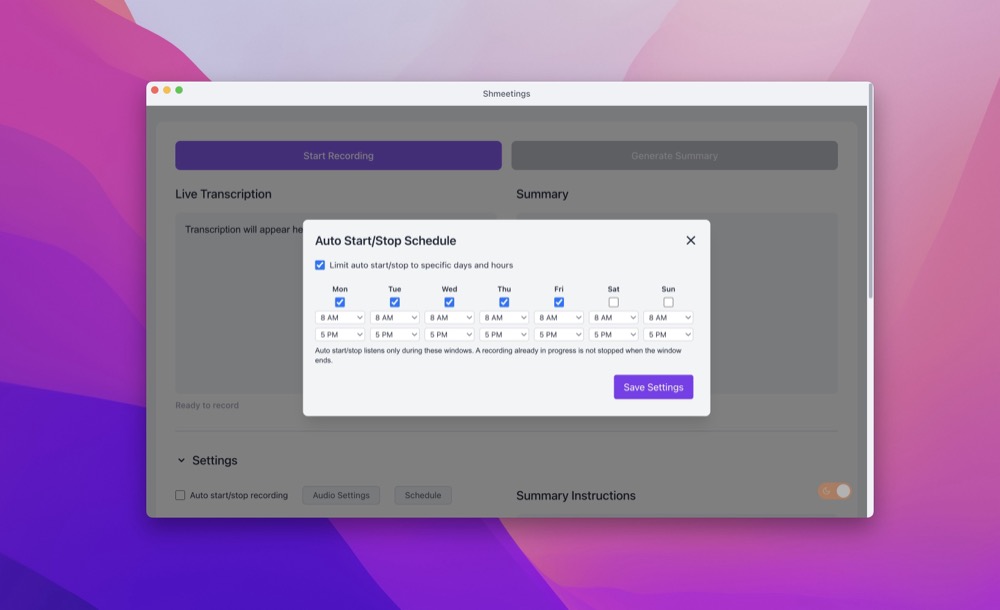
Open Settings, open the Auto Start/Stop Schedule dialog, and check "Limit auto start/stop to specific days and hours." Each day of the week gets its own checkbox and its own start and end times, because your Tuesdays and your Thursdays don't have to look the same.
Two behaviors worth knowing:
- It listens only inside the windows. Outside them, auto start/stop simply doesn't fire, no matter what the mic picks up.
- It never cuts a recording short. If a recording is already in progress when the window ends, Shmeetings lets it finish. The schedule gates when listening can begin, not what you're allowed to finish capturing.
The setup most people want
Monday through Friday, 8 AM to 5 PM. It's the default shape of the dialog for a reason: the app handles every work call that lands in business hours, and outside them it's just a quiet icon in your menu bar. You stop thinking about it entirely, which was always the point of auto start/stop.
Shift workers, set the windows to match. Parents, set nothing for the hours the kids are home. The schedule is yours to draw.
That's 2.4. Update from inside the app and the schedule is waiting in Settings.