Honest breakdown of free audio to text transcription tools and their hidden limits

Free Audio to Text Transcription: What's Really Free and What's Not

Search for "free transcription from audio to text" and you will find a huge number of free transcribing tools claiming the same things. All are free. All are unlimited. None require sign-up. All deliver instant results. The problem is most of these tools are dishonest or exaggerating their claims to the point of absurdity.

The honest truth is this. There are some real free tools that operate directly on your PC. Then there are those that offer you thirty minutes of use before requesting a credit card. And then there are the free tools that will quietly send your recorded voice off to servers in other countries. What type of tool it is matters much more than what is stated as a benefit on the marketing page.

Here is a breakdown of the various plans, an explanation of what you can expect from them, and how to know which one will be best for you based on your needs.

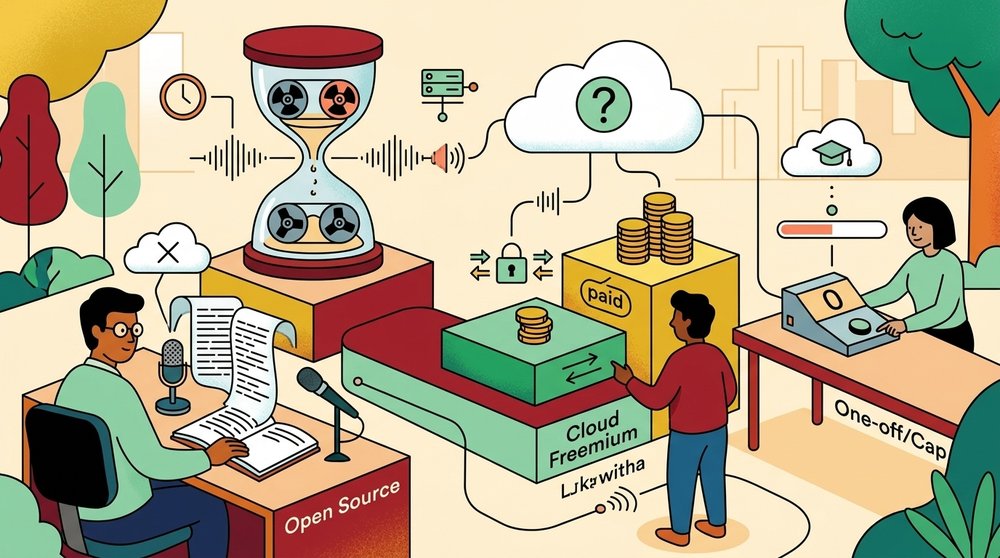
The Three Types of "Free" Transcription

The Three Types of Free Transcription

Free is used very often in transcription landing pages. There are free forever offerings, products with a 30 minute monthly limit, and free offers that only last until your trial ends.

Here are the three real categories.

Free, but limited. Most of the major players (Otter, Happy Scribe) are in this category. The free version will give you an allotment of time per month, say up to 300 minutes. Once that is exceeded, you have to pay. These would be great options for people who need to do just one podcast a month.

Free with signup. You will receive free access when signing up for the platform. In order to use it, a new user would need to create a profile and confirm it via an email, at which time they can start using the service. Note that by registering as a user your voice recordings are uploaded into their cloud storage system. Additionally, some of the products available use customer generated content in training their AI models. Therefore prior to uploading anything sensitive or confidential, review the terms of service.

Completely free, on your own machine. Tools like Whisper by OpenAI are open-source, so you can run them yourself with your own application. You will never have an account or be forced to send audio up into the cloud. The trade-off is in getting started, you need to install something.

What "Unlimited Free" Usually Hides

The term "free unlimited transcription" is commonly used by websites in order to get your attention. However, where does this free come from?

The first pattern is advertising. Many free tools have a banner at the top or bottom of the transcription which you have to copy around.

The second is data collection. Your audio, your transcription, and occasionally an IP address and a browser fingerprint are logged when using these tools. Collecting data from a client call or a doctor's office can be problematic. Data practices used by free consumer tools have been highlighted on multiple occasions by the Federal Trade Commission.

The third is a time limit which can be found in the fine print of their website. Their home page states unlimited. Their pricing page has limited it to up to thirty (30) minutes for each file. After uploading a forty five (45) minute meeting you are informed that they have exceeded the time limit.

The fourth is an export block or watermark. Transcription is available at no cost, however, there is a charge to download your transcription.

The fifth is the bait and switch. The tool is free for use in your trial, but will automatically convert into a paid version of that same product after you enter your credit card information "for verification purposes."

Genuinely Free Options That Work

Genuinely Free Options That Work

A number of options are free to use and will remain so.

Built-in OS Dictation

Both Windows and Mac come with an onboard speech to text application. The speech to text feature on a Mac is called Dictation. It is designed to do live speech as you go. Voice Typing on Windows does essentially the same thing. These services are free, local and completely private. They are also designed for real time voice recognition (live) and not for transcription of a pre-recorded audio file. You can play audio into the mic and capture what has been said, however this process is very cumbersome and there will be degradation of quality.

OpenAI Whisper

Whisper is an open source speech recognition model that can be downloaded. Once you have the model on your computer, you are able to transcribe any of your own audio files as many times as you want without limits or restrictions from any type of accounts or uploads. The quality of Whisper is comparable to other commercial paid for transcription services when using some of the larger models.

There are some downsides to using Whisper, primarily that setting up Whisper requires Python and an active command-line interface and can be a very time-consuming process. For those unfamiliar with the use of a terminal, Whisper may be out-of-reach. However, as a result of the development of several "wrappers," this is now significantly easier. You can find the official installation instructions on the Whisper GitHub repository.

Local Desktop Apps

There is an increasing number of applications that combine Whisper or other models with a simple user interface, allowing you to simply drop a file into the application, which will then transcribe the audio locally on your computer. The application will output the transcript as plain text. This eliminates all of the steps (server round-trip, billing caps) involved when using cloud-based services. To learn more about how this category of applications functions, check out our complete guide to local AI transcription.

For most users, this is the ideal location. It provides the user with the desired privacy while providing them with all of the benefits of using Whisper at no charge.

When Free Works and When It Doesn't

When Free Works and When It Doesnt

When Free Is Actually Fine

A lot of times free software will be appropriate for your needs better than what the cloud vendors would like you to believe.

The information in your transcription of a public lecture, a podcast that was recorded by you, and a voice note that you created is not private. Any cloud-based tool will be suitable for this type of non-private data as the limitations are just annoying, they are not hazardous.

For one-time use of free options on under thirty minute audio files, all of them are capable to meet your transcription needs. Create an account, complete your transcription, save it in whatever format you prefer, close your account and continue.

The privacy risks are relatively small if you are a student transcribing audio recordings of lectures as an aid in your studies. Additionally, the volumes will typically be low enough that a free tier should cover almost all of your weeks.

When Free Is a Problem

Free stops working as soon as the content matters.

Customer contact (client calls, sales calls, etc.) and all interactions that involve a customer's personal info shouldn't automatically go into a free cloud based app. Where is the voice file being saved? Who can hear it? How long does it exist on their server? The answer is, you have no idea. When it comes to your business, we cover what to consider when your compliance department is involved with the use of sales call recording software.

Interviews with individuals are also at some level of risk to privacy, particularly for journalists or researchers. Our interview transcription guide covers this topic as well.

Regulatory guidelines are very clear for medical conversations, legal depositions and HR discussions. Therefore, a free cloud service to store your audio will not be the best option.

High volume users will quickly run into limitations. Transcribing four hours of audio per day is simply too much for the free tier of any cloud solution. By the end of a week, it makes no sense to use anything but local applications, they may be a privacy option, but at this point they are clearly cost-effective.

How Free Tiers Actually Compare

How Free Tiers Actually Compare

Comparison Table

Tool TypeCostPrivacySetupGood For
Cloud free tier$0 up to capAudio storedNoneOne-off short files
Cloud freemium$0 then paidAudio storedEmail signupOccasional use
Whisper CLI$0Fully privateTechnicalDevelopers
Local desktop app$0 or one time feeFully privateInstall onlyMost users
Built-in OS dictation$0PrivateNoneLive dictation

Real Numbers on Free Tier Caps

At this point (early 2026), a very brief review of how much you can transcribe for free with each service is in order.

Otter allows for 300 minutes per month as part of their free plan, however, there are individual recording limits of thirty (30) minutes. Happy Scribe will give you a few minutes to test the service, then charge users by the minute. Rev does not have a meaningful free tier beyond a trial. Google's free Recorder app works only on Pixel devices, and the transcripts stay on your phone.

Compare that to running Whisper locally. Your hard drive and how patient you are is the only capacity limit. It takes a few minutes for a two hour file to be transcribed on a modern laptop. There are no monthly counters ticking down.

Here is how the free side-by-side options compare to the paid options in our Shmeetings vs Otter AI comparison and Shmeetings vs Fireflies comparison. We show you how each free option's limits compare to the paid version.

Making the Choice

Making the Choice

The Privacy Question

Free cloud tools are not evil. They are businesses that use audio data to improve their services and in some cases train their models. Whether this is a problem depends on what you are transcribing.

A good rule of thumb. If you wouldn't want your audio to show up in an internal training data set, then don't use a free tool for it. If you are using content that is truly public or non-sensitive, the privacy risk will be very low and the trade off of convenience will be well worth it.

If you're interested in an even more detailed look at how cloud services treat uploaded material, check out research from the Electronic Frontier Foundation.

The local tools bypass this issue altogether, you can be sure that your audio will remain on your computer. To walk through how this is done, refer to our offline meeting note taker guide.

How to Pick

Ask yourself three questions.

First, how sensitive is the audio? If your response is not at all, a cloud free tier will be sufficient. However, if you have any doubts, use a local tool.

Second, how many hours of audio do you generate each month? If it's less than a few hours you won't need to pay anything since a free cloud tier will cover your needs. However, if you are generating an hour or two per day, then using a local recording solution will not only be cheaper, but also much quicker as long as you're skipping the upload process.

Third, what amount of work will you be able to put into your installation process? Are you looking for an out-of-the-box solution where the operating system is already set up for voice-to-text, or a simple desktop application? Or are you a command line enthusiast who prefers using Whisper from the terminal? Or somewhere in between, perhaps a desktop application that allows for easy drag-and-drop use of your documents?

The majority of users choose option three. It is no cost to use, it is private, and there are no monthly limits for usage.

Frequently Asked Questions

Frequently Asked Questions

What is the best truly free audio to text transcription tool?

For most users, an application created to run locally from your desktop using Whisper offers a great combination of benefits including being free, private, and having no limit on usage for each month. The Whisper command line interface (CLI) is another alternative that provides similar results but also allows for even greater control if you are comfortable working at the command prompt level. Additionally, for real-time speech-to-text dictation there are also many applications integrated into Macs and PCs that can provide this functionality without charge or installation.

Are free online transcription tools safe to use?

They're generally fine for non-sensitive content. Read your provider's terms of service before using any tool to record client calls, interviews, etc. The same goes for any other type of recording that may include identifying data about a third party. Most free options will upload recordings to their server or use them as part of model development. Local tools eliminate this issue altogether.

How accurate is free transcription compared to paid?

Modern open source models like Whisper can perform as well or better than many of the paid cloud services available today for both accuracy and quality when it comes to clear English speech. When it comes to real-time functionality, speaker diarization, and customer support, however, paid services do outperform their open-source counterparts. In terms of straight-up transcription accuracy for an audio recording file, free options will generally compete with one another.

Why do free transcription tools have time limits?

Transcribing through speech-to-text incurs some costs to the provider. Running a speech to text engine on their servers isn't free for them, they have to pay for that service. That's why caps are there, so the free tier can be sustained and to encourage heavy users to move onto paid tiers. Local tools don't incur these types of costs since you're using your own computer time, typically very small.

Can I transcribe a Zoom or Teams meeting for free?

Yes, Zoom and Teams do have native transcription capabilities in their paid plans. Using either of them as a free option is possible, however you would need to record your meeting using the local recording feature and then use a third party tool that can process this recorded file. Our guide to transcribing a Zoom meeting provides all the details about how to complete this task.

Is Whisper free forever?

Yes. The Whisper model is available as an open-source project using the MIT License. You are able to download the model, run it on your local machine and utilize the model's output for whatever reason (including commercial purposes). OpenAI also offers a paid Whisper API, but the model itself is free to run locally.

← Back to Blog