
Meetily vs Shmeetings
Two AI meeting assistants that run on your own computer. One is free and open source. One costs $39 once and includes speaker labels.
The short answer
Both tools transcribe meetings locally with Whisper, and neither sends a bot into your calls. Meetily is the better pick if you want free, open-source software, Linux support, or an iPhone app. Shmeetings is the better pick if you want speaker labels, a summary model that works with no setup, and a one-time price: $39 once versus $120 per year for Meetily Pro.
What is Meetily?
Meetily is an open-source AI meeting note taker from Zackriya Solutions. It records your microphone and system audio, transcribes on your device with Whisper or NVIDIA Parakeet, and writes summaries with a local model or a cloud provider you pick. It runs on Mac (Apple Silicon), Windows and Linux, and its GitHub repository has about 33,000 stars.
The Community edition is free under the MIT license. Meetily Pro adds speaker diarization, meeting auto-detection, custom summary templates, PDF and DOCX export, and integrations such as MCP and webhooks. Pro is listed at $10 per user per month, billed yearly at $120, with a 14-day free trial.
What is Shmeetings?
Shmeetings is an offline AI meeting assistant for Mac and Windows. It transcribes meetings live with Whisper, labels each speaker, and writes summaries and action items with a local Llama model. Nothing goes to the cloud, and there is no cloud AI option to turn on by mistake.
Version 2.5 added speaker labels: click a label to rename it, and Shmeetings recognizes that voice in later meetings. It costs $39 once, with a 30-day money-back guarantee, and you can try it in your browser first.
Feature Comparison
Meetily facts are from meetily.ai, its pricing page and its GitHub repository, checked on November 26, 2026. "Not listed" means we did not find the feature on those pages.
| Feature | Shmeetings | Meetily |
|---|---|---|
| Price | $39 once No subscription | Free, or Pro at $120/year Pro listed as $10/user/month, billed yearly |
| Speaker labels (who said what) | Included Live labels, rename, merge | Pro only Speaker diarization is a Pro feature |
| Remembers voices across meetings | Yes Voiceprints stay on your computer | Not stated Pro lets you name speakers |
| Transcription | Whisper, on your computer 80+ languages | Whisper or Parakeet, on your computer Real-time |
| AI summaries | Built-in local model Llama 3.2 3B, or any GGUF model | Local or cloud Built-in model, Ollama, or Claude, OpenAI, Groq, OpenRouter with your API key |
| Works fully offline | Yes After the first model download | Yes, with local models Internet needed for Pro license activation |
| Bot joins the call | No Mic + system audio (Meeting Mode) | No Mic + system audio |
| Auto start/stop | Yes Starts on speech, with a weekly schedule | Pro only Auto-detect meetings |
| Suggested questions during the meeting | Yes Questions tab | Not listed |
| Email the summary after a meeting | Yes Through your own email server | Not listed |
| Transcribe audio files | Yes MP3, M4A, AAC, WAV | Yes Audio and video files (10 formats) |
| Export | .txt files Saved to a folder you pick | Markdown; PDF and DOCX in Pro |
| Integrations | None Plain files you can use anywhere | MCP, webhooks, CLI (Pro) |
| Platforms | Mac (Apple Silicon), Windows 10+ | Mac (Apple Silicon), Windows, Linux Plus an iPhone app |
| Source code | Closed source | Open source (MIT) Community edition, about 33k GitHub stars |
| Try before you buy | Free browser demo 5 tries, up to 3 minutes each | Free Community edition 14-day Pro trial |
Speaker Labels: The Biggest Difference
In a call with three or more people, a transcript without names is hard to use. You know someone promised the numbers by Friday, but not who. Meetily puts speaker diarization in its Pro plan. Shmeetings includes it in the $39 price.
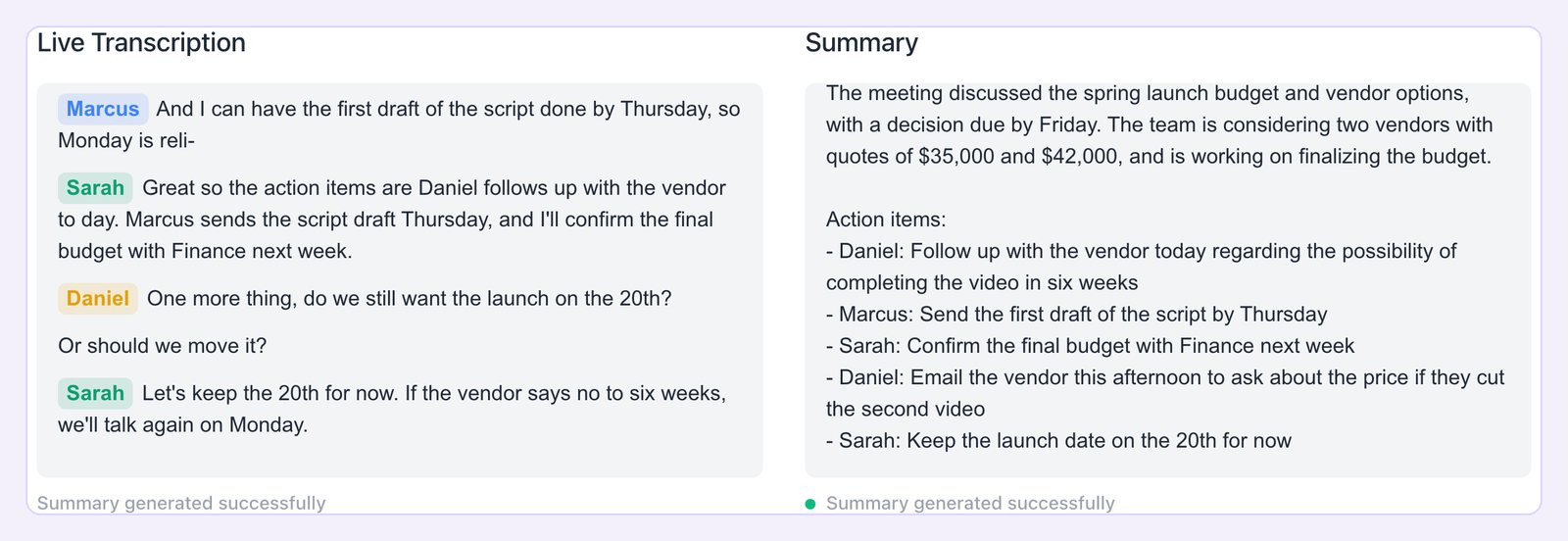
In Shmeetings, labels appear live (Speaker 1, Speaker 2), you rename them with a click, and the names carry into the summary. After you name someone, Shmeetings saves a voiceprint on your computer and labels that person for you in the next meeting.
Setup and Privacy
Both apps process your audio on your computer. The difference is in the options. Meetily lets you send transcripts to Claude, OpenAI, Groq or OpenRouter for summaries if you add an API key. That gives you stronger cloud models, but it is one more setting to check before you trust a recording to it. Shmeetings has no cloud AI option. The only feature that uses the internet is the optional summary email, sent through your own mail server. That makes it simpler to approve for legal, medical or client work.
Meetily's open-source code is a real advantage for privacy: anyone can read it. Shmeetings is closed source, so you rely on its offline design instead. You can check that yourself by turning off Wi-Fi and recording a meeting.
Who Should Use Each Tool
Choose Shmeetings If You:
- Want speaker labels without a yearly subscription
- Want a summary model that works out of the box, with no Ollama or API keys
- Want suggested questions during meetings and summaries sent to your email
- Want auto start/stop on a weekly schedule
- Use a Mac (Apple Silicon) or Windows PC
- Prefer to pay $39 once and be done
Choose Meetily If You:
- Want a free tool and can live without speaker labels
- Want open-source code you can read and audit
- Use Linux, or want an iPhone app
- Want PDF or DOCX export, or MCP and webhook integrations
- Want to choose cloud AI models for summaries
- Are fine with a yearly Pro license for the extra features
Cost Over Time
| Plan | 1 Year | 3 Years | 5 Years |
|---|---|---|---|
| Shmeetings (speaker labels included) | $39 | $39 | $39 |
| Meetily Community (no speaker labels) | $0 | $0 | $0 |
| Meetily Pro | $120 | $360 | $600 |
Meetily Pro at its listed yearly price, before any sale.
Frequently Asked Questions
Is Meetily really free?
Yes. Meetily Community is free and open source under the MIT license. Some features, including speaker diarization, auto-detecting meetings, PDF and DOCX export, and integrations, are in Meetily Pro, which costs $120 per year. Meetily's FAQ says each Pro license is for one device.
Does Meetily label speakers?
Speaker diarization (who said what) is listed as a Meetily Pro feature. Shmeetings includes speaker labels in its $39 one-time price, with one-click rename and voices it remembers for your next meeting.
Which one is more private?
Both can run fully on your computer. Meetily also lets you send transcripts to a cloud AI provider for summaries if you choose one. Shmeetings has no cloud option: transcription, speaker labels and summaries always run locally. Meetily's code is open source, so you can audit it; Shmeetings is closed source.
Do I need Ollama or a developer setup?
Shmeetings downloads its summary model the first time you open it, with no other setup. Meetily offers a built-in model and also supports Ollama and cloud APIs. Check meetily.ai for its current setup steps.
Does either one work on Linux or iPhone?
Meetily has Linux builds and an iPhone app. Shmeetings runs on Mac (Apple Silicon) and Windows 10 or later only.
Can I try Shmeetings first?
Yes. The free demo at demo.shmeetings.com runs the real Shmeetings app in your browser: 5 tries of up to 3 minutes each, no download and no account. Shmeetings also has a 30-day money-back guarantee.
See Shmeetings Label Your Meeting
Try the real app in your browser, then buy it once.
One-time purchase · 30-day money-back guarantee